Latest Post


A Computer Virus Is Some Kind Of A Program Or Software. It designed to spread by itself So  Virus Programs Run Or Installed without the user’s Approved .


How do computer viruses spread?


1. A virus can be spread by opening an email attachment,

2. visiting an  Virus infected website or viewing an Virus

3. infected website advertisement

4. It can also be spread through infected removable storage  devices, ( USB drives , CDs ,Android Or Apple Phones,Portable Hard Drives )


How do i Know have a virus in my computer ??


1) Change  the Home Page In Web Browser
  
      Your usual homepage may change to another website,for instance. Plus, you may be unable to reset it

2) Unusually slow computer performance
     
         A sudden change of processing speed could signal that your computer has a virus


3) Unexpected pop-up windows

          Unexpected onscreen ads are a typical sign of a virus infection

4) Crashes and error messages
  
      If programs start opening and closing automatically,your system freezes or shuts down for no reason.

    
   5) Missing files

    Some Virus delete files and programs.it's Very Dangerous thing because while You open A program it's stuck because of deleting files.


How to skip or avoid computer viruses?


1. Use a trusted antivirus product. and keep it updated

2. Avoid clicking on any pop-up advertisements.

3. Always scan your email attachments before opening them.

4. Always scan the files that you download using file sharing  Programs


How to remove computer viruses

⦁  you can format infected  thing  (USB drives , CDs ,Android Or Apple Phones ,Portable Hard Drives )

⦁ Fully scan the Computer or infected  thing  Using Virus Guard

             
                          If you Like this article Don't Forget To share 


What is the difference between 32-bit and 64-bit versions of Windows?

The terms 32-bit and 64-bit refer to the way a computer's processor (also called a CPU), handles information. The 64-bit version of Windows handles large amounts of random access memory (RAM) more effectively than a 32-bit system.


How can I tell if my computer is running a 32-bit or a 64-bit version of Windows?

To find out if your computer is running a 32-bit or 64-bit version of Windows in Windows 7 or Windows Vista, do the following:

  1. Open System by clicking the Start button , right-clicking Computer, and then clicking Properties.
  2. Under System, you can view the system type.


Which version of Windows should I install: the 32-bit version or the 64-bit version?

To install a 64-bit version of Windows, you need a CPU that's capable of running a 64-bit version of Windows. The benefits of using a 64-bit operating system are most apparent when you have a large amount of random access memory (RAM) installed on your computer, typically 4 GB of RAM or more. In such cases, because a 64-bit operating system can handle large amounts of memory more efficiently than a 32-bit operating system, a 64-bit system can be more responsive when running several programs at the same time and switching between them frequently.
How do I tell if my computer can run a 64-bit version of Windows?

To run a 64-bit version of Windows, your computer must have a 64-bit-capable processor. To find out if your processor is 64-bit-capable, do the following:

Open Performance Information and Tools by clicking the Start button  , and then clicking Control Panel. In the search box, type Performance Information and Tools, and then, in the list of results, click Performance Information and Tools.
Click View and print detailed performance and system information.
In the System section, you can see what type of operating system you're currently running under System type, and whether or not you can run a 64-bit version of Windows under 64-bit capable. (If your computer is already running a 64-bit version of Windows, you won't see the 64-bit capable listing.


So what does a 64bit operating system do for you?

  • more security.
  • faster applications designed for it.
  • allows using more than 4GB of RAM.
  • performance 32bit software can request more memory in a shorter time.


Disadvantages

  • need more RAM: they map the memory in 64bit blocks (red lines in diagram), not 32bit, so all your program memory consumption is higher (1,4x-1,7x).
  • 32bit applications, the majority, run in emulation mode.
  • old 16 bit software, (Windows 98 / PowerPC Mac) ceases to natively work.

                                  If you Like this article Don't Forget To share 


What is a disposable email ?


Disposable e-mail (temporary e-mail)  is a service that allows a registered users to receive emails at a temporary address (it's only valid for temporary period )

What Is The Importance Of This Service  ??

             Many online discussion forums, blogs and websites ask visitors to register before they can post comments, view premium content or download . A disposable email account will allow the visitor to sign up and verify his registration This disposable email (temporary e-mail)   Service save our email from virus , adds


Best disposable email (temporary e-mail) Service Web  Sites

(to visite  the  disposable email (temporary e-mail) Service  Web Sites click web site image !!)


1)  TempMail | Free, 1 Hour Only


Tempail provides you with disposable e-mail addresses which expire after 1 Hours. You can sign up to websites, social media (facebook,twitter) and read the incoming e-mails.


 2) Mailinator | Free / Paid


  • Use Any Inbox – Give out a Mailinator address anytime a website asks for an email address. Seriously, think one up right now
  • Prevent Spam – Use Mailinator for when you don’t want to get spammed at your real email address. Give’em Mailinator!
  • QA Teams Love Us! – Send your test emails here. Need API access or use Selenium? Or maybe your own Private Domain? Upgrade!
  • Disposable Email – Mailinator public email is auto-deleted after a few hours. Email to Mailinator is in the public domain.
  • Private Domain – Attach your domain to Mailinator. Get every email address for your private domain in One, big, (private), inbox!
  • Upgrade Plans – Upgrade your Mailinator account to get privacy, storage, your own private domain, and API access!


3) AirMail | Free


AirMail is a free temporary email service, you are given a random email address you can use when registering to new websites or test-driving untrusted services. All emails received by AirMail servers are displayed automatically in your online browser inbox.

  • Keep spam out of your inbox – Using our random temporary email address, spam will never get to your real email.
  • Keep your real email safe – Don’t let people you don’t trust know your real email.
  • View HTML email securely – Air Mail strips hidden tracking code in HTML emails so the sender doesn’t get your ip and browser details.
  • Test drive new services safely – Check out new web sites and services and when you are ready, give them your real email.
  • Check it later – You can read your inbox via your browser, at a later time using a unique URL.
  • Don’t waste time on signups – Instant activation. We don’t ask for usernames or passwords


4)  Minute Mail | Free


10 Minute Mail will give you a temporary e-mail address for 10 minutes. Any e-mails sent to that address will show up automatically on the web page. You can read them, click on links, and even reply to them. The e-mail address will expire after 10 minutes. Why would you use this? Maybe you want to sign up for a site which requires that you provide an e-mail address to send a validation e-mail to. And maybe you don’t want to give up your real e-mail address and end up on a bunch of spam lists. This is nice and disposable. And it’s free. Enjoy!


5) Temp Mail | Free


Temporary anonymous email service is specifically designed to protect your privacy. This service has appeared relatively recently. Answers to frequently asked questions will help you to clarify the service offered and to immediately make full use of our convenient and fully secure service.


                          If you Like this article Don't Forget To share 


                        In earlier graphics processing was very basic and could be done by the CPU along with all the other processing (calculations). However, as computer games advanced and started using 3D graphics, the CPU had too much to do and CPU-makers could not keep up on making them faster. Eventually, video cards were invented to solve this problem. Video cards are designed to have their own processor called the Graphics Processing Unit or GPU. This lets the CPU do more work since it does not have to spend any time on advanced graphics calculations; it can simply pass these calculations off to the GPU to be done.


Related image

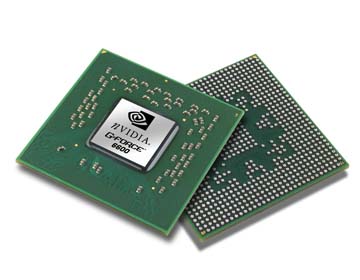
               a video card (also called a graphics card ) is a special circuit board that controls what is shown on a computer monitor and calculates 3D images and graphics.


Graphics card processors 

Image result for normal vga card parts


A video card can be used to display a two-dimensional (2D) image like a desktop, or a three-dimensional (3D) image like a computer game. 

Image result for vga card parts
Most computers have a basic video and graphics capabilities built-in to the computer's motherboard. These video cards are not as fast as in separate Video cards. They are fast enough for basic computer use and basic computer games. If a computer user wants faster and more detailed graphics, a video card can be installed separately.


Image result for how to connect  vga card

Video cards have their own processor (called a Graphics Processing Unit or GPU).The GPU's job is to handle graphics calculations. 3D graphics calculations take a lot of CPU power, so having a video card to handle the graphics calculations lets the CPU work on other things like running computer programs.

 Image result for vga card vector
Video cards also have their own memory, separate from the main computer memory. It is usually much faster than main computer memory, too. This helps the GPU do its graphics calculations even faster. Most video cards also can make one computer use more than one computer monitor at one time.


Graphics Cards manufacturers 


Image result for nVidia and ATI

Graphics manufacturers nVidia and ATI have special technologies that allow two identical cards to be linked together in a single computer for much faster performance. nVidia calls their technology SLI and ATI calls their technology CrossFire. Some modern graphics cards can even process physics calculations to create even more realistic-looking 3D worlds.


Video cards typically connect to a motherboard using the Peripheral Component Interconnect (PCI),


How to connect  VGA card


Image result for VGA card slots


Image result for pci in computer


                                      If you Like this article Don't Forget To share 


Wi-Fi is a way of connecting to a Computer Network using Radio waves instead of wires. It was invented to connect computers that are near each other and nowadays is much used for Internet connections.


WiFi Hotspots  ?? 

A hotspot is a virtual  location if the hotspot router connect to the internet hotspot using  people can access Internet through the hotspot


Hotspots can be found in many places: on campuses, in offices, in cafes, and even at home. For example, you can have a WiFi hotspot at home by having a wireless router !!

Public hotspots may be created by a business for use by customers, such as coffee shops or hotels.
(Some Time Need a Password To Connect the Hotspot )

Private hotspots may be configured on a smartphone or tablet with a mobile network data plan to allow Internet access to other devices via Bluetooth pairing or if both the hotspot device and the device/s accessing it are connected to the same Wi-Fi network. 


 Example - file transferring between 2 phone or 2 laptop  


Image result for super beam


         WIFI Devices


 1 ) Routers 

Image result for router


Routers Use to Create Hotspot Or Connect to the Internet


2)WIFI Antenna

Image result for WIFI Antenna

This Devices Use To Track WIFI Signal  or Improve Signals  Basically  This Devices  Use For Desktop Computers


                          If you Like this article Don't Forget To share 


           Random Access Memory (or simply RAM) is the memory or information storage in a computer that is used to store running programs and data for the programs. Data (information) in the RAM can be read and written quickly in any order. Normally, the random access memory is in the form of computer chips.

Usually, the contents of RAM are accessible faster than other types of information storage (rom etc) but Data lost every time while computer is turned off.Since the late 20th century, RAM uses transistors  to store data. Before that, magnetic memory was the usual kind


There are two  types of RAM
     
            1) Static RAM (SRAM)

                2)  Dynamic RAM (DRAM)  


  1) Static RAM (SRAM)

Image result for static ram images


 2)  Dynamic RAM (DRAM)  

Related image

Image result for dynamic ram vs static ram images


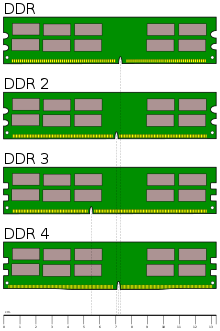
In these days we use DDR Ram Cards . But we don't know how to identify it .this pictures will help you to identify it

Image result for what is ddr

Image result for what is ddr


Difference Between S-RAM & D-RAM


                               If you Like this article Don't Forget To share 

MKRdezign

Contact Form

Name

Email *

Message *

Powered by Blogger.
Javascript DisablePlease Enable Javascript To See All Widget