Articles by "Computer Hardware & Network"

How to Open Outlook in Safe Mode


Outlook Safe Mode?

Use Outlook in safe mode if you can't open some of your Outlook windows, the settings freeze when you make changes, you suspect that a recently installed

How To?

1) Press the keyboard shortcut Win+R to open the Run dialog box. Or, type run in the Windows Search box and press Enter.


2) In the Run dialogue box, enter outlook.exe /safe and select OK.


3) In the Choose Profile window, choose the default Outlook option and select OK to open that profile.


4) Outlook starts in safe mode.


What is Firewalls?

A firewall is a system that provides network security by filtering incoming and outgoing network traffic  For example, you often hear people in companies say things like, "I can't use that site because the firewall blocks it".

.


How Firewalls Work?
firewall block all virus websites. it's means firewall is a some kind filter machine because The firewall monitors all this information traffic to allow ‘good data’ in, but block ‘bad data’ from entering your computer.


Types of firewalls

            There are two types of firewalls.

                                          1) Software firewall
     
                                          2) Hardware firewall


Software firewall


Image result for software firewall
        Software firewall are the most popular network protection method for home users. They usually come as stand-alone applications or as part of a complete virus guard software . a software firewall can also protect against Trojan or Worm applications  The firewall software must be regularly updated to keep up with the latest technological improvements and provide effective protection against the latest network attacks


Hardware firewall

Image result for hardware firewall

            it's a some kind of network devices such as routers and can protect every single machine on a network and require little configuration to work effectively. Hardware firewall use for server computers mainly Hardware firewalls sit directly behind your router.Another benefit of hardware firewalls is that they’re always on.There’s no need to worry about protection !! these devices are built for 24 protection
 
  
                                If you Like this article Don't Forget To share 


Best alternative for Internet Download Manager - Xtreme Download Manager


Today we are going to show you the best alternative Software for internet download manager .we uses the internet download manager to download all videos, sounds… From the internet. But it’s not free so we face that license problem day by day. Finding a valid license key is very difficult. We thought to give an option to fix that matter. Xtreme Download Manager is the best solution. Let’s see how to download it and use it.  

1) Download. Xtreme Download Manager (click the link).

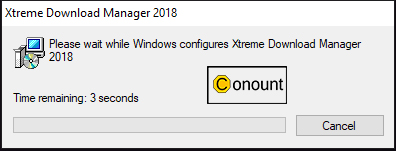
2) Double Click and install Xtreme Download Manager. (Don't Forget to alow                      permission by pressing the ok button in the permission message box)


3) Complete the normal Setup processor 

That’s all now successfully install it!


Setup 1

To add a new link click the below image and past your URL (link) in the address box (you decide where to download your file by clicking folder icon near to file bar) and click the Download button.


Setup 2

To download videos you can see a download button in your web browser don’t think too much just press the download button and select your video from the list click the button and select the video from the list that' all 


   If you Like this article Don't Forget To Share


Computer network installation can be daunting but with a few guidelines, you can install a good network at your home or office. Networking allows computers to share peripherals and allows one computer to back up the data of another. Also, networks can enable a single computer to act as an Internet access point for the entire network without the inconvenience of fitting a modem and telephone extension for each computer.

1) Planning
This involves defining business requirements and growth plans to build a framework for connecting computers and other equipment in the organization. Good network planning eases the process of a suitable network installation. Here users need to consider usage requirements and assess who will manage the network. Usage, maintenance, expansion and security issues also need consideration.

2) Hardware requirements
Once the planning has been done, the next stage involves understanding what hardware will be required and what hardware your network will support. These can include back-up devices, uninterruptible power supplies, network printers, etc. Once this is determined you need to understand how many network points will be required. Hubs and switches should have sufficient ports for various connections. Also, there should be enough scope for growth and expansion in the future.

5) Network design
Here various aspects like the kind of topology, network operating system, the right network interface cards and cabling need to be considered. If the network is small, a basic topology like ring, bus, mesh or star may be used. But if the network is complex, a hybrid of two or more technologies may need to be implemented. The location of the network cables, various devices, hubs, switches, servers, printers, firewalls, routers and modems needs consideration. Building or leasing regulations that may affect the cabling also need to be kept in mind. Security issues, both within the organization and on the Internet also need consideration.

6) Support services
Here you need to consider resources like consultants, support staff, other in-house staff and where they are located. You will need to consider the staff for management, security, maintenance and training. Employees will require to adopt new habits while using the network and sufficient training needs to be provided in this regard.

Networks can help people share information, efficiently access the Internet, and work collaboratively. As networks become necessary, it is important to know which technologies will work for your organization. To help make an informed choice on what technologies, hardware and support systems to useFree Web Content, Vipersystems offers its turnkey solutions. Our services enable your organizations to install suitable networks that are easy to upgrade and expand.

                                     If you Like this article Don't Forget To Share 


Source: from ArticlesFactory


In today’s world, every organization uses Computer network to maintain a proper flow of data communication. The Computer network is the lifeline of an organization responsible for regulating data transmission throughout the complete hierarchical structure. These networks are used to share and exchange information which can be a text file, image file or multimedia file. Computer Networking is a very familiar word among the office people. Some time have you got seen below errors in your office computer or personal computer Then you Need to Setup Your Network Properly.   


What is Computer network?
A computer network is a set of computers connected together for the purpose of sharing resources. The most common resource shared today is a connection to the Internet. Other shared resources can include a printer or a file server.

Advantages of the Computer network?.
   
1) It enhances communication and availability of information. 
 Networking, especially with full access to the web, allows ways of communication that would simply be impossible before it was developed. Instant messaging can now allow users to talk in real-time and send files to other people wherever they are in the world, which is a huge boon for businesses. Also, it allows access to a vast amount of useful information, including traditional reference materials and timely facts, such as news and current events.

2) It allows for more convenient resource sharing. 
This benefit is very important, particularly for larger companies that really need to produce huge numbers of resources to be shared with all the people. Since the technology involves computer-based work, it is assumed that the resources they wanted to get across would be completely shared by connecting to a computer network which their audience is also using.

3) It makes file sharing easier. 
Computer networking allows easier accessibility for people to share their files, which greatly helps them with saving more time and effort since they could do file sharing more accordingly and effectively.

4) It is highly flexible. 
This technology is known to be very flexible, as it gives users the opportunity to explore everything about essential things, such as software without affecting their functionality. Plus, people will have the accessibility to all the information they need to get and share.

5) It is an inexpensive system. 
Installing networking software on your device would not cost too much, as you are assured that it lasts and can effectively share information with your peers. Also, there is no need to change the software regularly, as mostly it is not required to do so.

6)   It increases cost efficiency. 
With computer networking, you can use a lot of software products available on the market which can just be stored or installed in your system or server and can then be used by various workstations.

7) It boosts storage capacity. 
Since you are going to share information, files, and resources to other people, you have to ensure all data and content are properly stored in the system. With this networking technology, you can do all of this without any hassle, while having all the space you need for storage.

 Disadvantages of the Computer network?.

1)  It lacks independence.
 Computer networking involves a process that is operated using computers, so people will be relying more on computer work, instead of exerting an effort for their tasks at hand. Aside from this, they will be dependent on the main file server, which means that, if it breaks down, the system would become useless, making users idle.

2) It poses security difficulties. 
Because there would be a huge number of people who would be using a computer network to get and share some of their files and resources, a certain user’s security would be always at risk. There might even be illegal activities that would occur, which you need to be careful about and aware of.

3)  It lacks robustness. 
As previously stated, if a computer network’s main server breaks down, the entire system would become useless. Also, if it has a bridging device or a central linking server that fails, the entire network would also come to a standstill. To deal with these problems, huge networks should have a powerful computer to serve as a file server to make setting up and maintaining the network easier.

4) It allows for more presence of computer viruses and malware. 
There would be instances that stored files are corrupt due to computer viruses. Thus, network administrators should conduct regular check-ups on the system, and the stored files at the same time.

5)  Its light policing usage promotes negative acts. 
It has been observed that providing users with internet connectivity has fostered undesirable behavior among them. Considering that the web is a minefield of distractions—online games, humor sites, and even porn sites—workers could be tempted during their work hours. The huge network of machines could also encourage them to engage in illicit practices, such as instant messaging and file sharing, instead of working on work-related matters. While many organizations draw up certain policies on this, they have proven difficult to enforce and even engendered resentment from employees.

6) It requires an efficient handler. For a computer network to work efficiently and optimally,
 it requires high technical skills and know-how of its operations and administration. A person just having basic skills cannot do this job. Take note that the responsibility to handle such a system is high, as allotting permissions and passwords can be daunting. Similarly, network configuration and connection is very tedious and cannot be done by an average technician who does not have advanced knowledge.

7) It requires an expensive set-up.
Though computer networks are said to be an inexpensive system when it is already running, its initial set up cost can still be high depending on the number of computers to be connected. Expensive devices, such as routers, switches, hubs, etc., can add up to the cost. Aside from these, it would also need network interface cards (NICs) for workstations in case they are not built-in.


Google Chrome is now undoubtedly the best web browser of the World Wide Web. More than 44.5% of total web users are using Google Chrome. Sometimes, Yahoo users face some problems in loading their email accounts in Google Chrome. If you are having the same problems in your Yahoo account, here are some quick fixes for it.

1) Clear the Browser Cache:
The Browser cache collects the temporary actions of the web pages for faster loading. But sometimes, it prevents the action of the web page as the data gets corrupt with time. You need to clear the cache of the browser to fix the issue. To clear the browser cache in chrome, go to the Toolbar and click More Tools and then Clear Browsing Data. Click the checkboxes of Cookies and other site data and Cached images and files. And then click Clear browsing data.

2) Update the browser:
 Any website runs best in an updated version of the browser. The performance of most of the Yahoo products is hugely based on the browser. The Yahoo Mail may not work properly if you are using an old version of the browser. If you are using an old version of the Chrome browser, then update it urgently.

3) Restart the System: 
Sometimes, your system can not execute any command due to over-heating issues. If your system is running for a long time, then restart it. And can try to load your Yahoo account in Google Chrome after the restarting.

4) Enable JavaScript: 
Sometimes, JavaScript is not enabled in the Chrome and Yahoo confronts some problems like hidden or misplaced text, difficulty performing or viewing and inability to click icons for that. You should enable JavaScript in Chrome from Setting > Show Advance Setting> Privacy> Content Settings and select Allow all sites to run JavaScript.

5) Disable Browser Enhancement: 
The third-party browser enhancement creates a problem with the display of Yahoo. You need to disable the browser enhancement to get a seamless service. To disable the enhancement, you need to open Chrome click Menu and then go to More Tools> Extensions. If you have any extension, Remove it.

6) Disable anti-virus: 
Sometimes, the anti-virusFree Articles, firewall and antispyware programs disrupt the action the websites. If you need to temporarily disable those program to load your Yahoo account in Google Chrome. You need to check the website of the respective antivirus program to disable it. 


                     If you Like this article Don't Forget To Share 

Source: from ArticlesFactory


                       Driver software  is a program that make connection  between hardware ( Cd Rom,VGA Card,Network Card) and operating system (windows 7,windows 8, Linux - Ubuntu ,fedora)


Related image


      A driver acts like a translator between the device and operating system .Each device has its own set of specialized commands that only its driver software knows


                     For example -if you bought a new VGA card you need to install the VGA card to computer motherboard  after finished computer still don't know it is a VGA card. to fix  this matter driver software helps to identifies the VGA card


                    Some other computer parts do not need drivers (or the driver is built-in to the operating system) because they use a kind of standard; the operating system recognizes those parts and knows how to use those parts


Image result for computer drivers


Some Famous Drivers


Printer Driver

Image result for printer

                    A program that controls a printer. Whenever you print a document, the printer driver takes over, feeding data to the printer with the correct control commands. Most modern operating systems come with printer drivers for the most common types of printers, but you must install them before you can use the printer. You can also download updated drivers from the printer manufacturer's Web site.


VGA Driver


Image result for VGA card explain


                                A program that controls your Display Setting also you can download updated drivers And download from the Vga manufacturer's Web site or third party software  (ex- Drove bost , Drivers Pack ) 


                                  If you Like this article Don't Forget To share  


What is the difference between 32-bit and 64-bit versions of Windows?

The terms 32-bit and 64-bit refer to the way a computer's processor (also called a CPU), handles information. The 64-bit version of Windows handles large amounts of random access memory (RAM) more effectively than a 32-bit system.


How can I tell if my computer is running a 32-bit or a 64-bit version of Windows?

To find out if your computer is running a 32-bit or 64-bit version of Windows in Windows 7 or Windows Vista, do the following:

  1. Open System by clicking the Start button , right-clicking Computer, and then clicking Properties.
  2. Under System, you can view the system type.


Which version of Windows should I install: the 32-bit version or the 64-bit version?

To install a 64-bit version of Windows, you need a CPU that's capable of running a 64-bit version of Windows. The benefits of using a 64-bit operating system are most apparent when you have a large amount of random access memory (RAM) installed on your computer, typically 4 GB of RAM or more. In such cases, because a 64-bit operating system can handle large amounts of memory more efficiently than a 32-bit operating system, a 64-bit system can be more responsive when running several programs at the same time and switching between them frequently.
How do I tell if my computer can run a 64-bit version of Windows?

To run a 64-bit version of Windows, your computer must have a 64-bit-capable processor. To find out if your processor is 64-bit-capable, do the following:

Open Performance Information and Tools by clicking the Start button  , and then clicking Control Panel. In the search box, type Performance Information and Tools, and then, in the list of results, click Performance Information and Tools.
Click View and print detailed performance and system information.
In the System section, you can see what type of operating system you're currently running under System type, and whether or not you can run a 64-bit version of Windows under 64-bit capable. (If your computer is already running a 64-bit version of Windows, you won't see the 64-bit capable listing.


So what does a 64bit operating system do for you?

  • more security.
  • faster applications designed for it.
  • allows using more than 4GB of RAM.
  • performance 32bit software can request more memory in a shorter time.


Disadvantages

  • need more RAM: they map the memory in 64bit blocks (red lines in diagram), not 32bit, so all your program memory consumption is higher (1,4x-1,7x).
  • 32bit applications, the majority, run in emulation mode.
  • old 16 bit software, (Windows 98 / PowerPC Mac) ceases to natively work.

                                  If you Like this article Don't Forget To share 


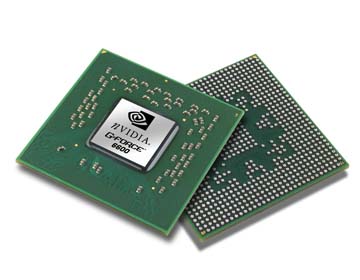
                        In earlier graphics processing was very basic and could be done by the CPU along with all the other processing (calculations). However, as computer games advanced and started using 3D graphics, the CPU had too much to do and CPU-makers could not keep up on making them faster. Eventually, video cards were invented to solve this problem. Video cards are designed to have their own processor called the Graphics Processing Unit or GPU. This lets the CPU do more work since it does not have to spend any time on advanced graphics calculations; it can simply pass these calculations off to the GPU to be done.


Related image

               a video card (also called a graphics card ) is a special circuit board that controls what is shown on a computer monitor and calculates 3D images and graphics.


Graphics card processors 

Image result for normal vga card parts


A video card can be used to display a two-dimensional (2D) image like a desktop, or a three-dimensional (3D) image like a computer game. 

Image result for vga card parts
Most computers have a basic video and graphics capabilities built-in to the computer's motherboard. These video cards are not as fast as in separate Video cards. They are fast enough for basic computer use and basic computer games. If a computer user wants faster and more detailed graphics, a video card can be installed separately.


Image result for how to connect  vga card

Video cards have their own processor (called a Graphics Processing Unit or GPU).The GPU's job is to handle graphics calculations. 3D graphics calculations take a lot of CPU power, so having a video card to handle the graphics calculations lets the CPU work on other things like running computer programs.

 Image result for vga card vector
Video cards also have their own memory, separate from the main computer memory. It is usually much faster than main computer memory, too. This helps the GPU do its graphics calculations even faster. Most video cards also can make one computer use more than one computer monitor at one time.


Graphics Cards manufacturers 


Image result for nVidia and ATI

Graphics manufacturers nVidia and ATI have special technologies that allow two identical cards to be linked together in a single computer for much faster performance. nVidia calls their technology SLI and ATI calls their technology CrossFire. Some modern graphics cards can even process physics calculations to create even more realistic-looking 3D worlds.


Video cards typically connect to a motherboard using the Peripheral Component Interconnect (PCI),


How to connect  VGA card


Image result for VGA card slots


Image result for pci in computer


                                      If you Like this article Don't Forget To share 


Wi-Fi is a way of connecting to a Computer Network using Radio waves instead of wires. It was invented to connect computers that are near each other and nowadays is much used for Internet connections.


WiFi Hotspots  ?? 

A hotspot is a virtual  location if the hotspot router connect to the internet hotspot using  people can access Internet through the hotspot


Hotspots can be found in many places: on campuses, in offices, in cafes, and even at home. For example, you can have a WiFi hotspot at home by having a wireless router !!

Public hotspots may be created by a business for use by customers, such as coffee shops or hotels.
(Some Time Need a Password To Connect the Hotspot )

Private hotspots may be configured on a smartphone or tablet with a mobile network data plan to allow Internet access to other devices via Bluetooth pairing or if both the hotspot device and the device/s accessing it are connected to the same Wi-Fi network. 


 Example - file transferring between 2 phone or 2 laptop  


Image result for super beam


         WIFI Devices


 1 ) Routers 

Image result for router


Routers Use to Create Hotspot Or Connect to the Internet


2)WIFI Antenna

Image result for WIFI Antenna

This Devices Use To Track WIFI Signal  or Improve Signals  Basically  This Devices  Use For Desktop Computers


                          If you Like this article Don't Forget To share 


           Random Access Memory (or simply RAM) is the memory or information storage in a computer that is used to store running programs and data for the programs. Data (information) in the RAM can be read and written quickly in any order. Normally, the random access memory is in the form of computer chips.

Usually, the contents of RAM are accessible faster than other types of information storage (rom etc) but Data lost every time while computer is turned off.Since the late 20th century, RAM uses transistors  to store data. Before that, magnetic memory was the usual kind


There are two  types of RAM
     
            1) Static RAM (SRAM)

                2)  Dynamic RAM (DRAM)  


  1) Static RAM (SRAM)

Image result for static ram images


 2)  Dynamic RAM (DRAM)  

Related image

Image result for dynamic ram vs static ram images


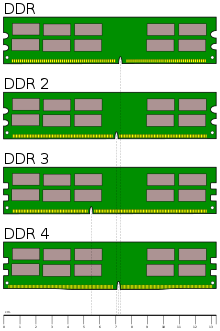
In these days we use DDR Ram Cards . But we don't know how to identify it .this pictures will help you to identify it

Image result for what is ddr

Image result for what is ddr


Difference Between S-RAM & D-RAM


                               If you Like this article Don't Forget To share 

MKRdezign

Contact Form

Name

Email *

Message *

Powered by Blogger.
Javascript DisablePlease Enable Javascript To See All Widget